cplieger/web-terminal-kiro
Run the Kiro CLI in your browser, from any laptop, tablet or phone
50K+
cplieger/web-terminal-kiro repository overview
web-terminal-kiro
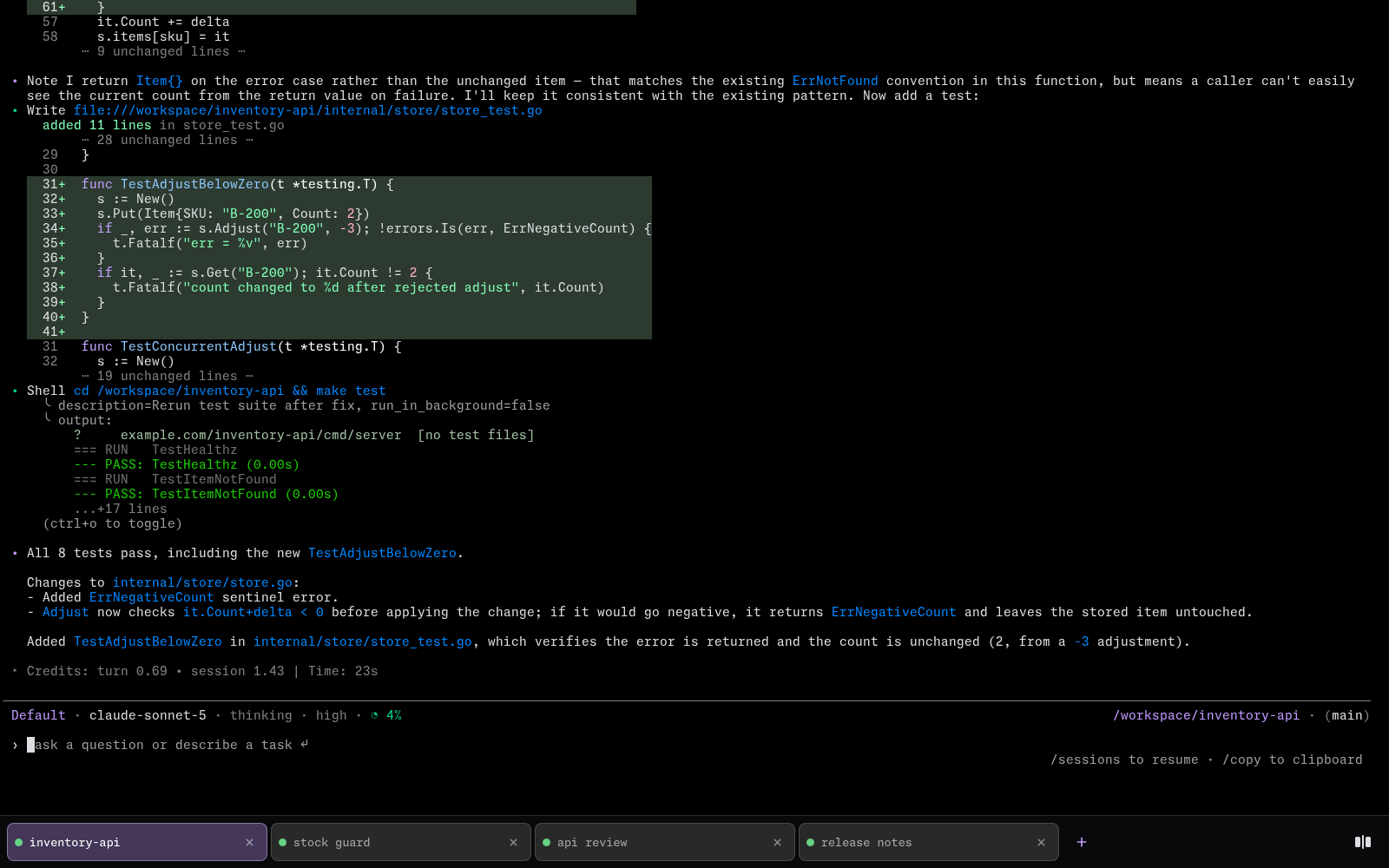
Web Terminal for Kiro runs the Kiro CLI (kiro-cli) in your browser, from any laptop, tablet or phone, on a server you host. It shows kiro-cli's own terminal screen, with no chat layer on top.
What it does
Work with the Kiro agent from any device and pick up each session where you left off.
- Gives each tab its own kiro-cli session, with reorderable tabs, a two-pane split view and a page address per tab. The browser tab shows the conversation you are looking at:
fix build · Web Terminal for Kiro. - Works on a phone, with on-screen keys for Tab, Esc, the arrows, Enter and Ctrl.
- Keeps each session running while your phone sleeps or the network drops, and restores the screen on return.
- Downloads kiro-cli on first start and installs the tools you list, language servers included.
- Marks each tab as working, done or waiting for your answer.
Who it is for
Web Terminal for Kiro is built for kiro-cli users who want it on every device, with nothing to install there. The agent looks and works as it does in a local terminal.
You need a Kiro account and a Docker host. You also need a private network or a reverse proxy with a login in front of it.
Some setups suit a different kind of tool. Consider ttyd if you want to share any command-line program in a browser. Consider marotte, by the same author, if you prefer a chat window with a file editor and git tools.
Web Terminal for Kiro is free software under the MPL-2.0 license.
Pull
docker pull cplieger/web-terminal-kiro:latest
Also published to ghcr.io/cplieger/web-terminal-kiro with identical images and tags. Release versions are tagged vX.Y.Z alongside latest.
Quick start
# Example compose for web-terminal-kiro. See the README for all configuration options and hardening.
services:
  web-terminal-kiro:
    image: ghcr.io/cplieger/web-terminal-kiro:latest
    container_name: web-terminal-kiro
    restart: unless-stopped
    # Required. An init at PID 1 cleans up the processes each session leaves behind.
    init: true

    environment:
      # Optional. Put a GitHub token in .env as GH_TOKEN or GITHUB_TOKEN to
      # raise GitHub's limit on tool version checks. Every terminal tab can
      # read it.
      - GH_TOKEN
      - GITHUB_TOKEN

    ports:
      # Anyone who can reach this port gets a root shell, and there is no login.
      # Put a reverse proxy with a login in front. See README "Security".
      # Set ALLOWED_HOSTS to every name or IP you open in a browser.
      - "9848:9848"

    volumes:
      # kiro-cli sign-in, installed tools and settings. The disk must allow running programs.
      - "/opt/appdata/web-terminal-kiro/config:/config"
      # Your repositories. Each new tab starts in this folder.
      - "/opt/appdata/web-terminal-kiro/workspace:/workspace"
      # Images you paste into a tab. Optional. Without it, they are lost when the container is recreated.
      - "/opt/appdata/web-terminal-kiro/uploads:/uploads"
Documentation
- Full documentation — configuration, behavior, security
- Configuration
- Features
- Security
- How Web Terminal for Kiro works
- Tools
- Contributing
- Releases and changelog
License
MPL-2.0. See LICENSE. The image carries the license text of every bundled component under /usr/share/licenses/.
The image redistributes two web fonts under their own licences, each served beside the font it covers. Monaspace Neon NF is under the SIL Open Font License 1.1 (/vendor/fonts/MonaspaceNeonNF-LICENSE). Web Terminal Glyphs, the tiling overlay listed ahead of it, is under Apache-2.0 (/vendor/fonts/WebTerminalGlyphs-LICENSE, with its /vendor/fonts/WebTerminalGlyphs-NOTICE).
Tag summary
Content type
Image
Digest
sha256:3c5b20262…
Size
77.5 MB
Last updated
about 23 hours ago
docker pull cplieger/web-terminal-kiro