epicsoft/altcha
Self-hosted ALTCHA challenge, verification and form mail service with an admin web UI
563
epicsoft/altcha repository overview
ALTCHA service
This Docker image is managed and kept up to date by epicsoft LLC.
A self-hosted service that protects web forms with ALTCHA proof-of-work challenges — for many sites at once, managed in a small web UI. It issues and verifies the challenges, serves the widget, and can mail a verified form submission, so a static site gets a working contact form without a backend of its own.
- Base image: https://hub.docker.com/_/node (
node:24-alpine), platformslinux/amd64andlinux/arm64 - Dockerfile: https://gitlab.com/epicsoft-networks/altcha/-/blob/main/Dockerfile
- Repository: https://gitlab.com/epicsoft-networks/altcha, mirrored to GitHub — issues are welcome on both; code changes only as merge requests on GitLab, the mirror cannot take pull requests
- Container registry: https://gitlab.com/epicsoft-networks/altcha/container_registry
- Docker Hub: https://hub.docker.com/r/epicsoft/altcha
- License: MIT
8080 | public port: widget, challenge, verify, submit |
8081 | admin port: web UI, site API, metrics, health check — keep it off the internet |
/data | volume with the SQLite database, writable for uid 1000 |
This project is not affiliated with or endorsed by the ALTCHA project. It uses the MIT licensed
altcha widget andaltcha-lib.
Features
- Challenges in the current ALTCHA format (widget v3), signed with HMAC and bound to the site they were issued for
- Every solution can be spent exactly once, also across restarts
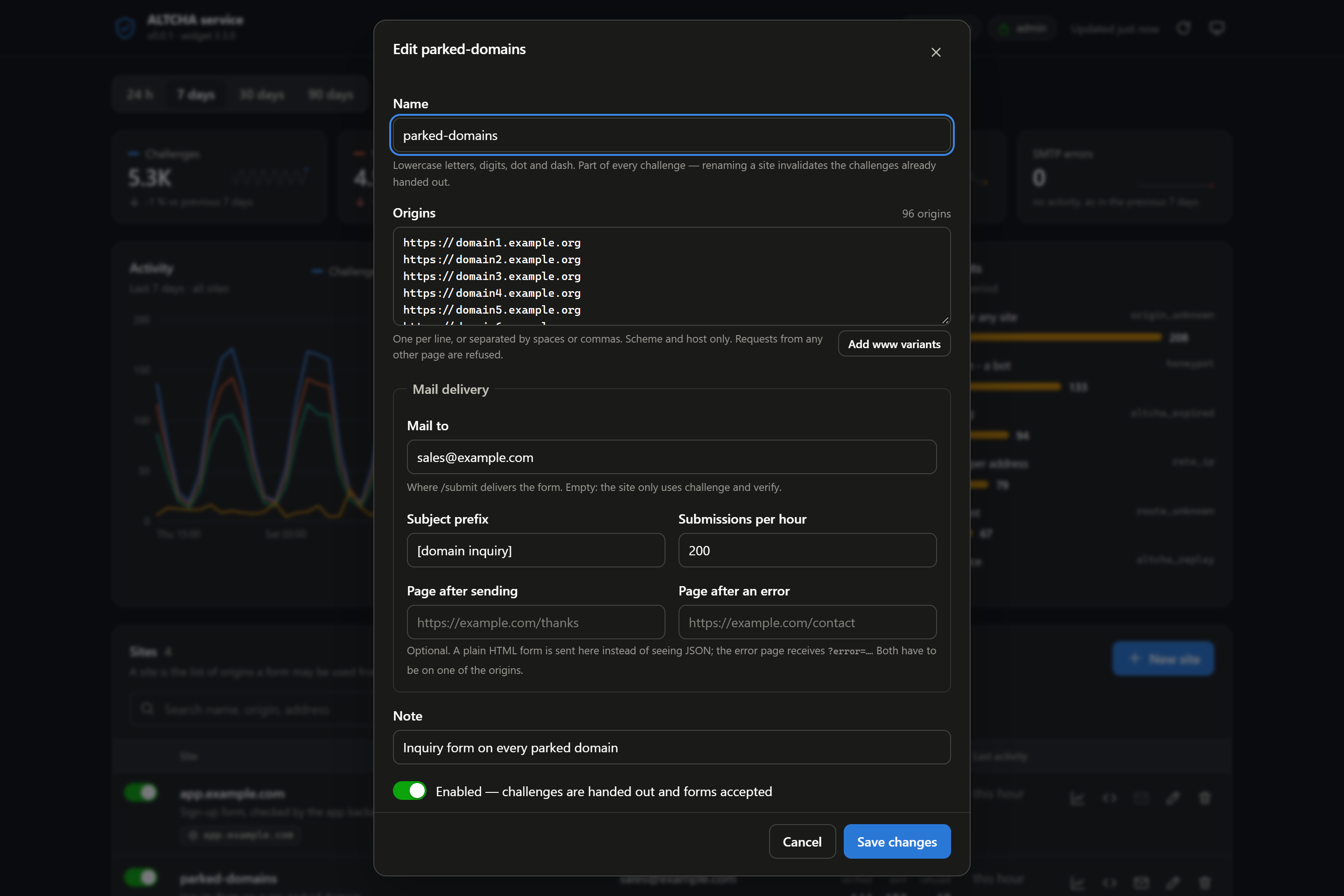
- Sites managed in a web UI: any number of allowed origins, mail recipient, subject prefix, rate limit, redirect pages
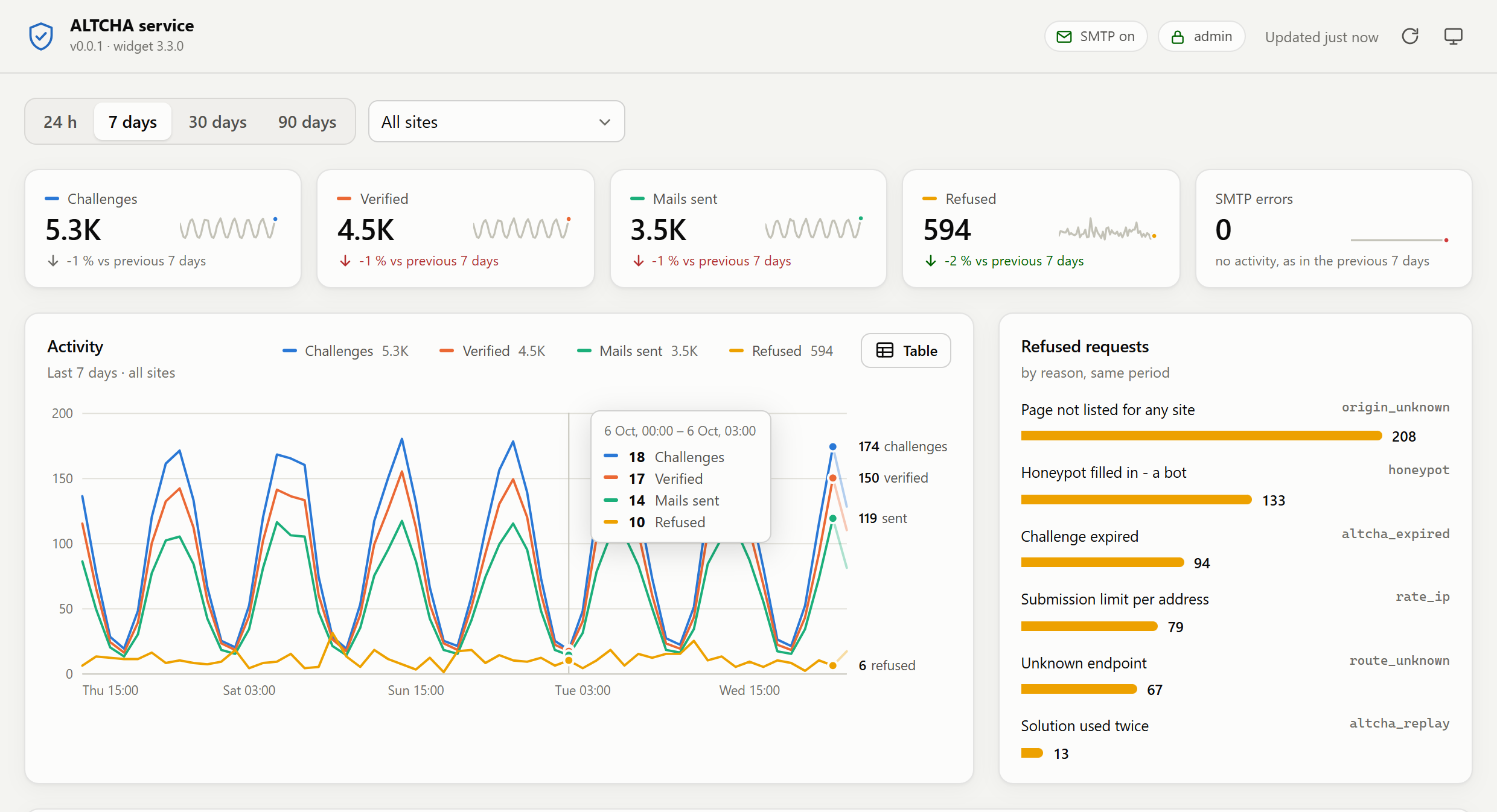
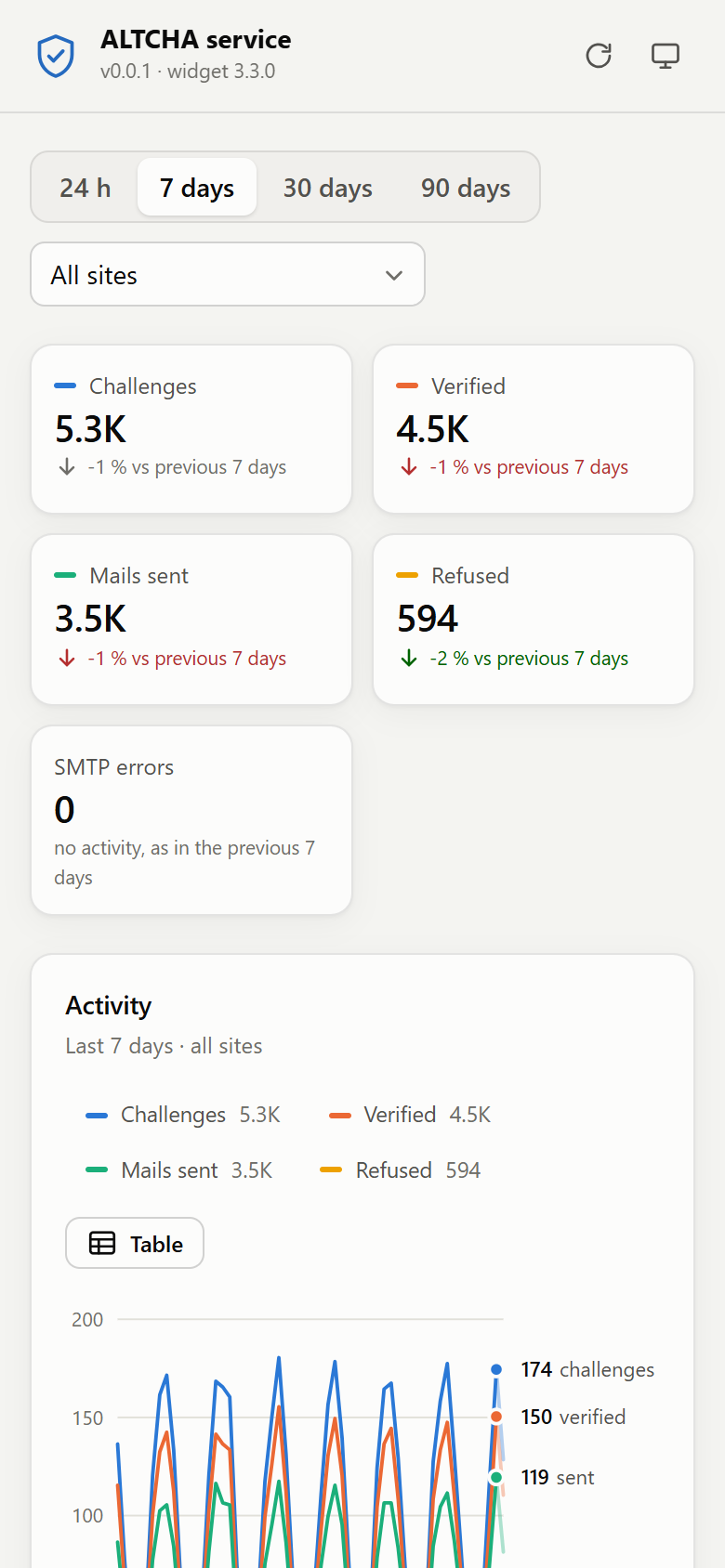
- Statistics in the web UI: activity over 24 hours to 90 days, totals compared with the period before, refused requests by reason — for all sites or one
/submitmails a verified form to the site's recipient — no backend needed for a static site/verifyfor applications with their own backend- The widget is served by the service itself, in English or with all of its 68 languages, so no project copies a JavaScript file into its repository
- Rate limits per client address and per site, a honeypot field, strict origin check
- No cookies, no state in the browser, no file uploads
- Prometheus metrics (requests, latencies, solve times, mail, database, process), a container health check, data in a single SQLite file
Screenshots
The admin UI with example data - activity of the last seven days, totals against the week before, refused requests by reason:
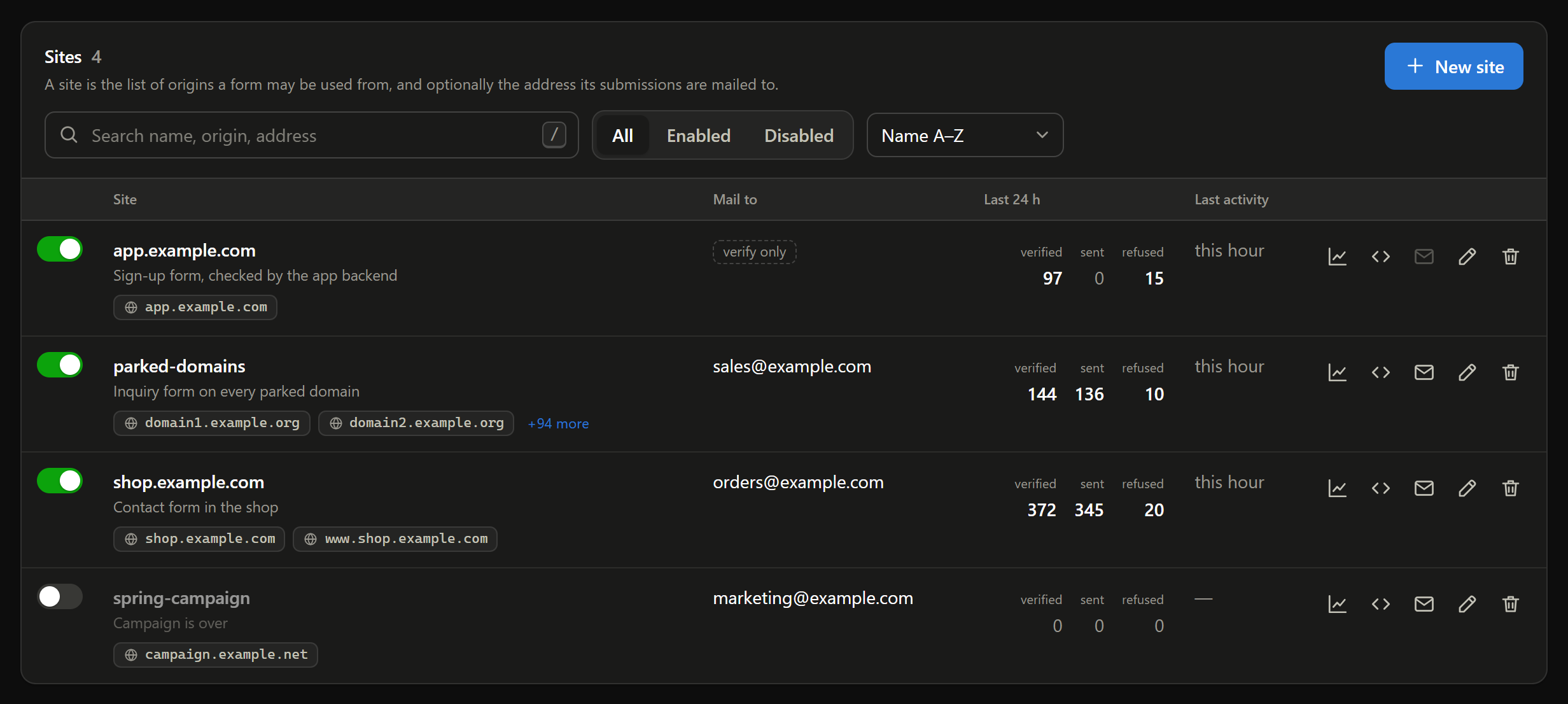
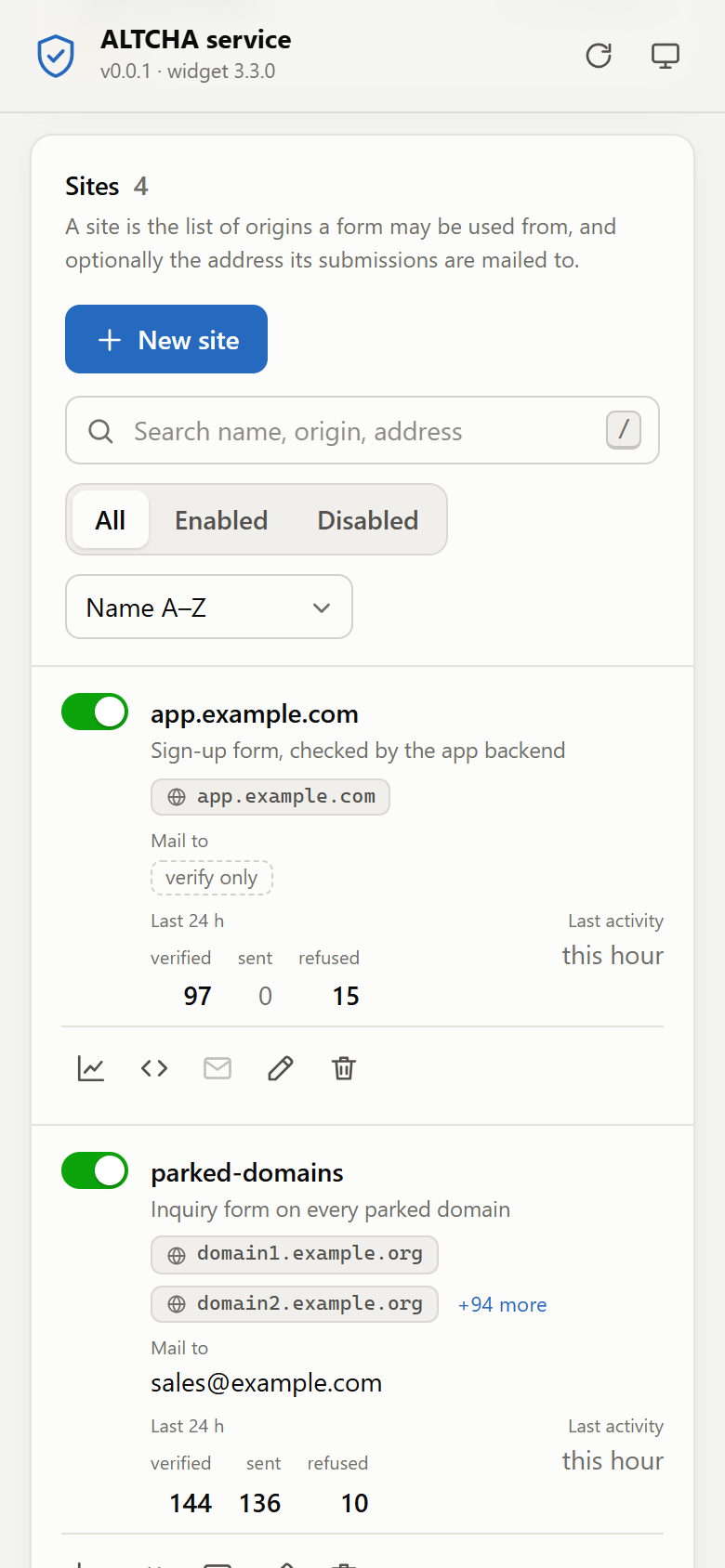
Sites with their origins, mail recipient and activity, switched on and off in the list - here in dark mode:
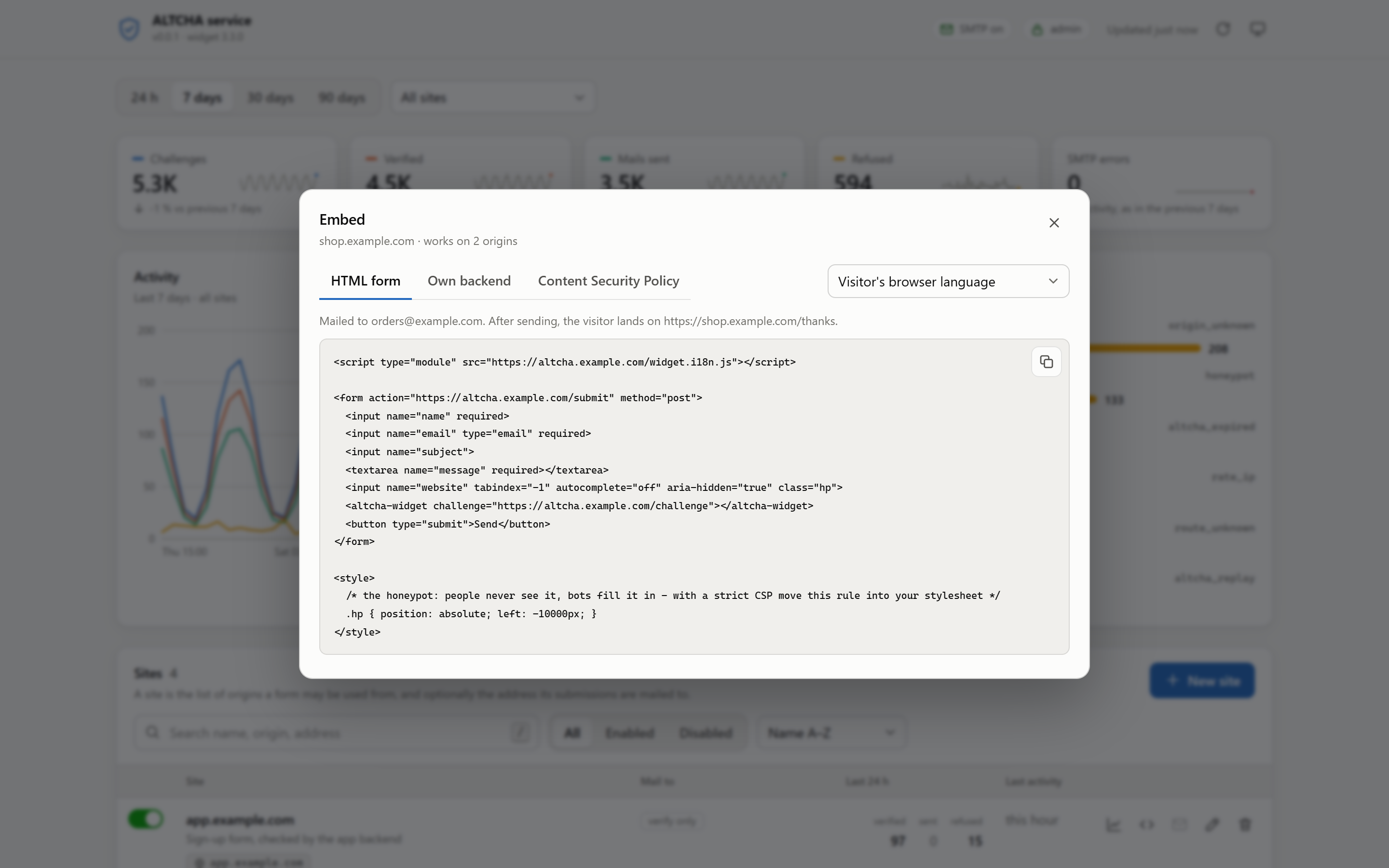
Editing a site with a hundred origins, and the embed code with the widget language of your choice:
On a phone:
How it works
browser                      this service                         your backend (optional)
   |  GET  /widget.js  ---------->|
   |  GET  /challenge  ---------->|  signed challenge for the site of the Origin
   |  (widget solves it)          |
   |  POST /submit  ------------->|  verify, mark as spent, mail to the site's recipient
   |                              |
   |  POST /your-form  -------------------------------------------------->|
   |                              |<------------  POST /verify  ----------|
   |                              |  verify, mark as spent  ------------->|
A request from a browser is mapped to a site by its Origin header (or Referer). A page that is not listed for any site gets no challenge and cannot submit.
Quick start
services:
  altcha:
    image: epicsoft/altcha:0.0.1
    restart: unless-stopped
    environment:
      PUBLIC_URL: https://altcha.example.com
      TRUST_PROXY: 1            # one reverse proxy in front, see "Behind a reverse proxy"
      HMAC_SECRET_FILE: /run/secrets/altcha_hmac
      ADMIN_USERNAME: admin
      ADMIN_PASSWORD_FILE: /run/secrets/altcha_admin
      SMTP_HOST: mail.example.com
      SMTP_USERNAME: [email protected]
      SMTP_PASSWORD_FILE: /run/secrets/altcha_smtp
      SMTP_FROM: [email protected]
    secrets:
      - altcha_hmac
      - altcha_admin
      - altcha_smtp
    volumes:
      - ./data:/data
    ports:
      - "127.0.0.1:8080:8080"   # public port - reached through the TLS proxy on this host
      - "127.0.0.1:8081:8081"   # admin UI - never on a public address
    read_only: true
    cap_drop: [ALL]
    security_opt: [no-new-privileges:true]

secrets:
  altcha_hmac:
    file: ./secrets/hmac        # at least 32 random characters, e.g. openssl rand -hex 32
  altcha_admin:
    file: ./secrets/admin
  altcha_smtp:
    file: ./secrets/smtp
The service runs as user node (uid 1000), so the data directory has to be writable for it:
mkdir -p data && sudo chown 1000:1000 data
Open the admin UI on port 8081, create a site with its origins (for example https://www.example.com) and, if the service should mail its form, a recipient. The Embed button shows the snippet for that site.
Embedding
A form mailed by the service
<script type="module" src="https://altcha.example.com/widget.js"></script>

<form action="https://altcha.example.com/submit" method="post">
  <input name="name" required>
  <input name="email" type="email" required>
  <input name="subject">
  <textarea name="message" required></textarea>
  <input name="website" tabindex="-1" autocomplete="off" aria-hidden="true" class="hp">
  <altcha-widget challenge="https://altcha.example.com/challenge"></altcha-widget>
  <button type="submit">Send</button>
</form>

<style>
  .hp { position: absolute; left: -10000px; }
</style>
- No build step and no npm package — the same two lines work in a hand-written HTML file, in Astro and in Angular.
- A plain form post (as above) is redirected to the site's page after sending or page after an error; the error page receives the reason as
?error=<reason>. Without these pages, and for every request sent withfetch, the answer is JSON:{"ok":true}or{"ok":false,"error":"<reason>"}. - Every field of the form ends up in the mail.
email, when it holds a plain address, becomes theReply-To;subjectfollows the site's subject prefix, separated by a space. websiteis the honeypot (HONEYPOT_FIELD): a human never fills it in. A submission that does is answered like a success and dropped. Under a Content Security Policy without'unsafe-inline'for styles the<style>block is ignored and the field shows — move the rule into your stylesheet then.- For a widget in another language use
/widget.i18n.js(all translations, about 180 kB instead of 120 kB) and setlanguage="de"on<altcha-widget>.
Pages with a Content Security Policy
The widget is loaded from this service, fetches its challenge from it, solves it in Web Workers it creates from a blob: URL (falling back to data:), and adds one <style> element to the page. A page with a CSP has to allow that:
script-src  'self' https://altcha.example.com
connect-src 'self' https://altcha.example.com
worker-src  'self' blob:
form-action 'self' https://altcha.example.com
form-action only matters for a form that posts to /submit directly. For the <style> element, either allow 'unsafe-inline' in style-src, or put the nonce of your CSP into <meta name="csp-nonce" content="…"> — the widget sets it on the element.
A form handled by your own backend
The widget writes its solution into the form field altcha. Your backend passes it on:
curl -X POST https://altcha.example.com/verify \
  -H 'Content-Type: application/json' \
  -d '{"altcha": "<value of the altcha field>", "site": "example"}'
{"ok": true, "verified": true, "site": "example"}
A refused solution is answered with 403 and {"ok": false, "error": "<reason>"}. Send site — without it the service accepts a solution for any of its sites and only tells you which one it was in the answer. The solution is spent by this call: a second /verify with the same value is refused as altcha_replay.
Public endpoints
| Route | Purpose |
|---|---|
GET /widget.js | the ALTCHA widget (ES module, English) |
GET /widget.i18n.js | the widget with all translations |
GET /challenge | a new challenge for the site of the Origin |
POST /verify | check a solution, from a browser or a backend |
POST /submit | check a solution and mail the form to the site's recipient |
Bodies are accepted as application/x-www-form-urlencoded or application/json (flat, no nested objects), up to MAX_BODY_BYTES. multipart/form-data — and with it file uploads — is refused.
The reasons a request can be refused - the error of the answer and the reason of the metrics - are listed in the API reference.
Admin port
The admin port (ADMIN_PORT, default 8081) serves the web UI, the site API, /metrics and /healthz. Do not publish it on a public address. Bind it to 127.0.0.1, a VPN or an internal network; the sign-in is the second layer - the UI warns while there is none.
Signing in
Three ways, in any combination:
| Way | Set | For |
|---|---|---|
| Through a reverse proxy | ADMIN_PROXY_USER_HEADER (e.g. X-Forwarded-User, Remote-User) and ADMIN_TRUSTED_PROXIES | people - single sign-on via oauth2-proxy, Authelia, Traefik ForwardAuth or any proxy that signs users in and passes the name on |
| Basic auth | ADMIN_USERNAME, ADMIN_PASSWORD | people, without a proxy |
| API token | ADMIN_API_TOKEN (at least 32 characters) | scripts: Authorization: Bearer <token> |
- The proxy header is only believed from
ADMIN_TRUSTED_PROXIES- IP addresses or CIDR ranges of the proxies, as the service sees them (behind Docker usually the proxy container or the network gateway). From any other address the header is ignored, otherwise everybody could send it.ADMIN_ALLOWED_USERSnarrows it down to the listed user names; without it, everybody the proxy lets through is in. - After 10 failed passwords or tokens from one address the address is locked out for 15 minutes - also for correct credentials, so a lucky guess cannot be told apart. IPv6 counts per /64. Behind a trusted proxy the address is the last
X-Forwarded-Forentry.altcha_admin_auth_refused_totalcounts the refusals. - Requests with the API token need no
X-Altcha-Adminheader - a browser never sends a bearer token on its own, so there is nothing to forge. Everything else that changes something does. - Basic auth and a token travel with every request: reach the port through TLS or a tunnel when it is not on the same machine.
The API - routes, the shape of a site, examples with the token - is described in the API reference.
The web UI
- Statistics for 24 hours, 7, 30 or 90 days, for all sites or a single one: totals with the change against the period before, activity as a chart (with a table view and keyboard navigation), refused requests by reason. The period still running is drawn faint, so it does not read as a drop.
- Sites: search across name, note, address and origins, filter by state, sort by name or activity, switch a site on and off in its row, edit, delete, send a test mail, copy the embed code with the widget language of your choice.
- Refreshes itself every 30 seconds while the tab is visible. Light and dark follow the system and can be switched. Works down to phone width.
Behind a reverse proxy
Put a TLS terminating proxy in front of the public port. Set TRUST_PROXY to the number of proxies in front of the service, so the rate limits count the address of the visitor and not the one of the proxy: with TRUST_PROXY=1 the last entry of X-Forwarded-For is taken. Leave it at 0 when the port is reached directly — otherwise every client can pick its own address by sending the header.
Data and backups
Everything that has to survive a restart is in DATA_DIR (/data), in a single SQLite database altcha.db (WAL mode, so altcha.db-wal and altcha.db-shm sit next to it): the sites, the spent challenges and the statistics - hourly totals per site, kept for STATS_RETENTION_DAYS. The files are created readable for the service user only (0600), and the root file system of the container can stay read-only. The Prometheus counters live in memory and start at zero after a restart, as Prometheus expects.
A consistent copy while the service runs:
sqlite3 data/altcha.db ".backup 'altcha-backup.db'"
Copying the file alone is not safe while the service writes. epicsoft/dbbackup with BACKUP=sqlite and SQLITE_MODE=backup does the same on a schedule.
Upgrading
A new version brings its database changes along and applies them on start, each in a transaction. Take a backup before upgrading: going back to an older version after the database was changed does not work — a version that finds a database newer than itself refuses to start and says so in the log, rather than working on data it does not understand.
What is stored and logged
| Content | Kept | |
|---|---|---|
| Database | the sites; for every spent challenge its random nonce and expiry — no address, no form content | sites until deleted, nonces until the challenge expires |
| Memory | client addresses of the rate limits, counters | addresses for about an hour (the window plus a ten-minute cleanup), counters until the process ends |
| the submitted form fields, sent to the site's recipient | not stored by the service | |
| Log | refused requests with reason and site, refused admin sign-ins with reason (and the user name a proxy passed), changes in the admin UI with the user, mail server errors | as long as the container log is kept |
The service never writes a form field or a visitor's address to the database or to the log. What it sends on is the mail itself — the fields the form has, so a form should only ask for what the recipient needs.
SMTP_HOST switches /submit on. Each submission is one connection, one message:
SMTP_SECURITY | Port | |
|---|---|---|
starttls (default) | 587 | refuses to go on if the server does not offer STARTTLS |
tls | 465 | TLS from the first byte |
none | 25 or any | only for a relay on the same host or network; credentials are refused in this mode |
The certificate is always verified — against SMTP_TLS_SERVERNAME when the server is reached by a name that is not in its certificate, for example a container name. Login uses AUTH PLAIN, or AUTH LOGIN when the server offers only that.
The mail goes from SMTP_FROM to the site's recipient. The recipient comes from the site, never from the request, so the service cannot be used to send mail to anyone else. Subject and body are sent base64 encoded; no input of a visitor reaches a mail header except Reply-To, and that only after a strict address check.
Security and limits
- Proof of work proves that CPU time was spent — not who someone is. It keeps mass automation out; it does not stop an attacker who is willing to pay for the computing time. The origin check and the rate limits carry the same weight.
HMAC_SECRETsigns every challenge. Changing it invalidates all challenges in flight, nothing else. The service derives two separate keys from it (challenge signature and key signature).- Verification is cheap whatever
ALTCHA_COSTis set to: the service knows the answer when it issues the challenge and signs it, so checking a solution is two HMACs. Issuing a challenge costs one key derivation, which is whatRATE_CHALLENGE_PER_IPlimits. - CORS only lets a browser read the answer. The protection is the check on the server side, which also applies to requests that do not come from a browser.
- The service sets no cookies and keeps nothing in the browser. It protects forms; it cannot protect a whole page or a login.
Environment variables
HMAC_SECRETsecret for signing the challenges, at least 32 characters requiredPUBLIC_URLpublic address of the service, only used for the snippets in the admin UI (default: empty)PORTpublic port (default:8080)ADMIN_PORTadmin port (default:8081)ADMIN_USERNAME,ADMIN_PASSWORDBasic auth for the admin port; both or none (default: empty)ADMIN_API_TOKENbearer token for scripts on the admin port, at least 32 characters (default: empty)ADMIN_PROXY_USER_HEADERheader in which a signing-in proxy passes the user name (default: empty)ADMIN_TRUSTED_PROXIESIP addresses and CIDR ranges of the proxies in front of the admin port, comma separated; required withADMIN_PROXY_USER_HEADER(default: empty)ADMIN_ALLOWED_USERSuser names the proxy may let in, comma separated; empty lets in everybody the proxy signs in (default: empty)DATA_DIRdirectory of the database (default:/data)TRUST_PROXYnumber of reverse proxies in front of the service,0to10(default:0)ALTCHA_ALGORITHMPBKDF2/SHA-256,PBKDF2/SHA-384,PBKDF2/SHA-512,SHA-256,SHA-384orSHA-512(default:PBKDF2/SHA-256). Argon2id and scrypt are not offered: the widget needs separately loaded workers for themALTCHA_COSTcost of one attempt — PBKDF2 iterations, or hash rounds forSHA-*(default:5000)ALTCHA_COUNTER_MIN,ALTCHA_COUNTER_MAXrange of the number the browser has to find; the work grows with it (default:5000and10000)ALTCHA_EXPIRESseconds a challenge stays valid (default:600)RATE_CHALLENGE_PER_IPchallenges per client address and hour,0for no limit (default:60)RATE_SUBMIT_PER_IPsubmissions and browser verifications per client address and hour,0for no limit (default:10). The limit per site is set in the admin UIRATE_VERIFY_PER_IPverifications without anOrigin- from a backend - per address and hour; a backend speaks for all its visitors, hence the higher default.0for no limit (default:3600). All limits count IPv6 per /64MAX_BODY_BYTESlargest accepted request body (default:32768)HONEYPOT_FIELDname of the honeypot field (default:website)STATS_RETENTION_DAYSdays the hourly statistics are kept for the admin UI,1to3650(default:90)SMTP_HOSTmail server; empty switches/submitoff (default: empty)SMTP_PORT(default:587, withSMTP_SECURITY=tls465)SMTP_SECURITYstarttls,tlsornone(default:starttls)SMTP_TLS_SERVERNAMEname to check the certificate against (default:SMTP_HOST)SMTP_USERNAME,SMTP_PASSWORDlogin at the mail server; both or none (default: empty)SMTP_FROMsender address, a plain address required with SMTP_HOSTSMTP_FROM_NAMEdisplay name of the sender (default: empty)SMTP_HELOname inEHLO(default:altcha)SMTP_TIMEOUTseconds per mail server conversation step (default:20)TZtime zone of the log (default:UTC)
Secrets from files
HMAC_SECRET_FILE, ADMIN_PASSWORD_FILE, ADMIN_API_TOKEN_FILE and SMTP_PASSWORD_FILE read the value from a file instead, for Docker secrets, Kubernetes secret mounts and comparable mechanisms. A trailing newline is stripped. Setting a variable and its _FILE counterpart at the same time is an error, as is a missing or empty file — the service refuses to start and names the variable.
Metrics
GET /metrics on the admin port, Prometheus text format, behind the sign-in. It counts per site and per refusal reason, measures requests and latency per endpoint, the solve time in the browser and the age of a challenge when it is spent (the numbers to tune ALTCHA_COST and ALTCHA_EXPIRES with), mail delivery, refused admin sign-ins, the database, the process and the event loop.
Every metric with what it answers: docs/metrics.md. Alerting rules to start from: examples/prometheus-alerts.yml.
Versions
Released through a git tag X.Y.Z, which publishes X.Y.Z, X.Y, X and moves latest. Changes are listed in the changelog.
| Tag | Content |
|---|---|
0.0.1 | exactly this build - use this in production |
0.0 | latest patch of 0.0 |
latest | newest release of any version - can change the major version without warning |
develop | current state of the develop branch, not for production |
Before 1.0.0 any release may change the API or a variable, so pin the exact version; the changelog says what changed.
Development
npm ci
npm test                                                  # node --test, no Docker needed
HMAC_SECRET=$(openssl rand -hex 32) DATA_DIR=./data npm start
docker build -t altcha:dev .
Node.js 24.15 or newer — SQLite comes from the built-in node:sqlite module. .vfox.toml pins the version used for development.
Reporting problems
Issues are welcome on GitLab and GitHub. Please report a security problem as a confidential issue on GitLab instead of a public one.
License
MIT, see LICENSE.
Tag summary
Content type
Image
Digest
sha256:74a344f24…
Size
60.3 MB
Last updated
3 days ago
docker pull epicsoft/altcha